- Created on
Foldyard
- Authors

- Name
- Daniel Demmel
- Occupation
- Software engineer with
21 years of professional
experience
Open Foldyard on GitHub · Read the docs
It started in the comments
In January I wrote up how I was running coding agents in secured VS Code dev containers. It was a pragmatic setup: good enough to stop an over-eager agent from wandering around my home directory, and shareable with the team. What I didn't expect was that the comments under it would turn into one of the more useful conversations I've had about this whole topic.
At the end of April Giles Knap turned up with a much more thorough setup built on rootless Podman – where "root" inside the container is really just your own unprivileged user as far as the kernel is concerned – plus namespaces to hide credentials from the agent while the human's terminals kept them. A few replies later the thread had settled into a pattern I recognised from my own debugging: VS Code creates a fresh IPC socket for every integrated terminal, so my five-minute sweeper loop was always going to lose that race. p-buddy had a pen-testing Claude find the same hole from another angle, recovering a socket path from /proc/<pid>/environ even after the environment had been scrubbed.
Meanwhile I'd come back from a conference excited about Docker Sandboxes, only to find that nobody on the Docker Slack had worked out how to use it with VS Code short of running code-server in the browser. Giles was planning to switch editors entirely. And then came the comment that stuck with me:
I can't find anyone else on the internet actively discussing this issue.
– Giles Knap, in the comments of my dev containers post
Everyone in that thread was hand-rolling their own partial answer, filing down the sharp edges of tools that were never designed to be a security boundary. So was I.
What I wanted that nobody shipped
The more I looked, the more I found that each option got one half right and missed the other.
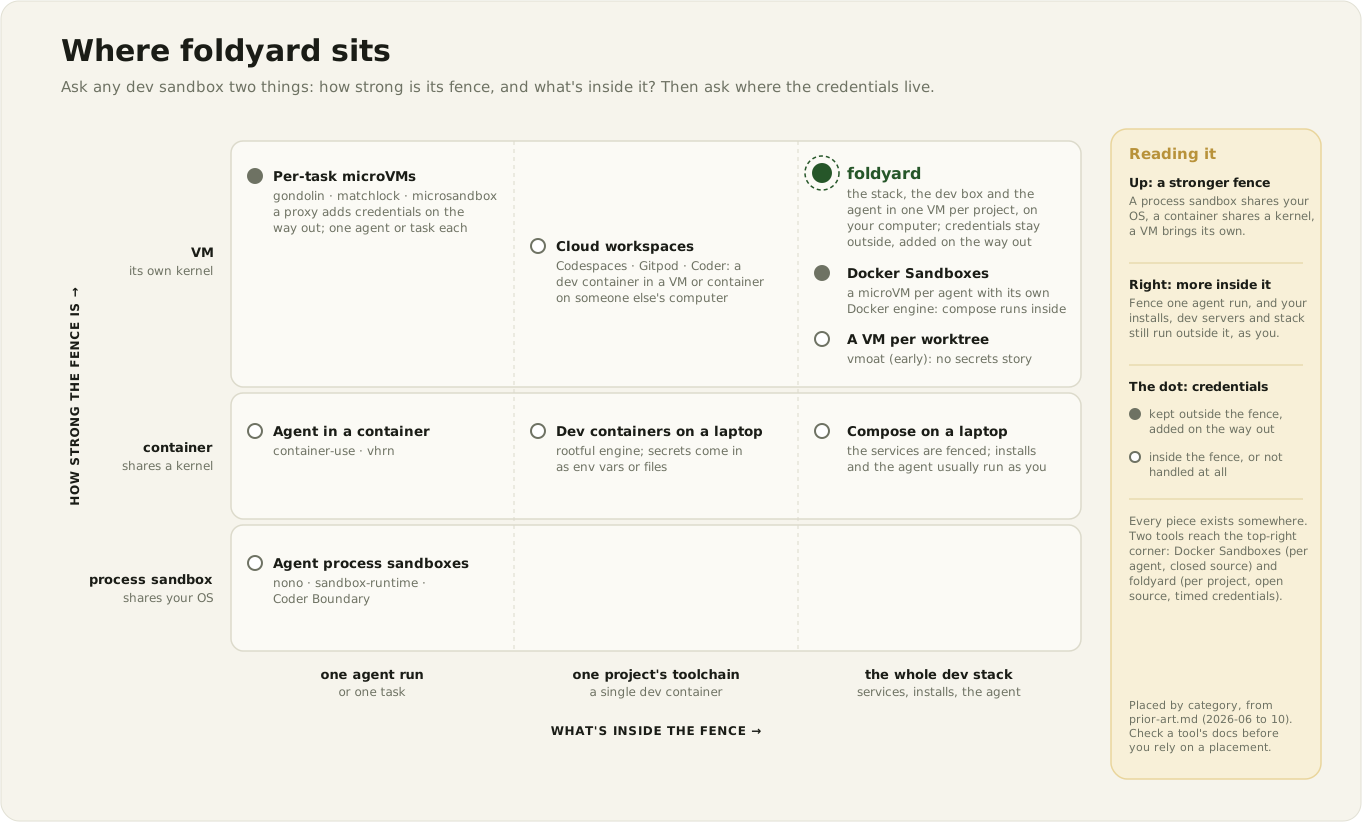
- Dev containers on Docker Desktop are lovely for reproducibility but aren't a boundary at all. The Docker Desktop VM mounts the whole of
/Users, and the engine is rootful, so a container that escapes to the VM can read your SSH keys and every other project on the disk. - Agent sandboxes – and there are a lot of them now – wrap one process. That's fine until your agent needs to run the end-to-end tests, at which point the database, the emulators and the dev server are all still running on your laptop, outside the fence.
- Docker Sandboxes is the closest thing to what I wanted: a micro-VM with its own engine, so the whole compose stack fits inside, and credentials handled by a proxy on the host. But it's closed source, needs a Docker account, and its unit is a sandbox per agent rather than a project and its worktrees.
- Cloud dev environments (Codespaces, Gitpod, Coder and friends) make exactly the right pitch – "the laptop holds nothing" – but they're remote-first, and mostly enterprise.
And the threat isn't really the agent anyway. The scarier thing is that npm install is remote code execution with extra steps, and the supply-chain worms of the past year (Shai-Hulud and its many sequels) were happy to run on developer laptops through install scripts, git hooks and VS Code tasks. An agent just makes it more likely that something untrusted gets read and acted on – one cleverly worded README is all it takes.
So the question I actually cared about was: what can untrusted code reach when it runs? And I wanted the answer to be "the repo, and nothing else" – for everything in the dev loop, not just the agent.
The yard
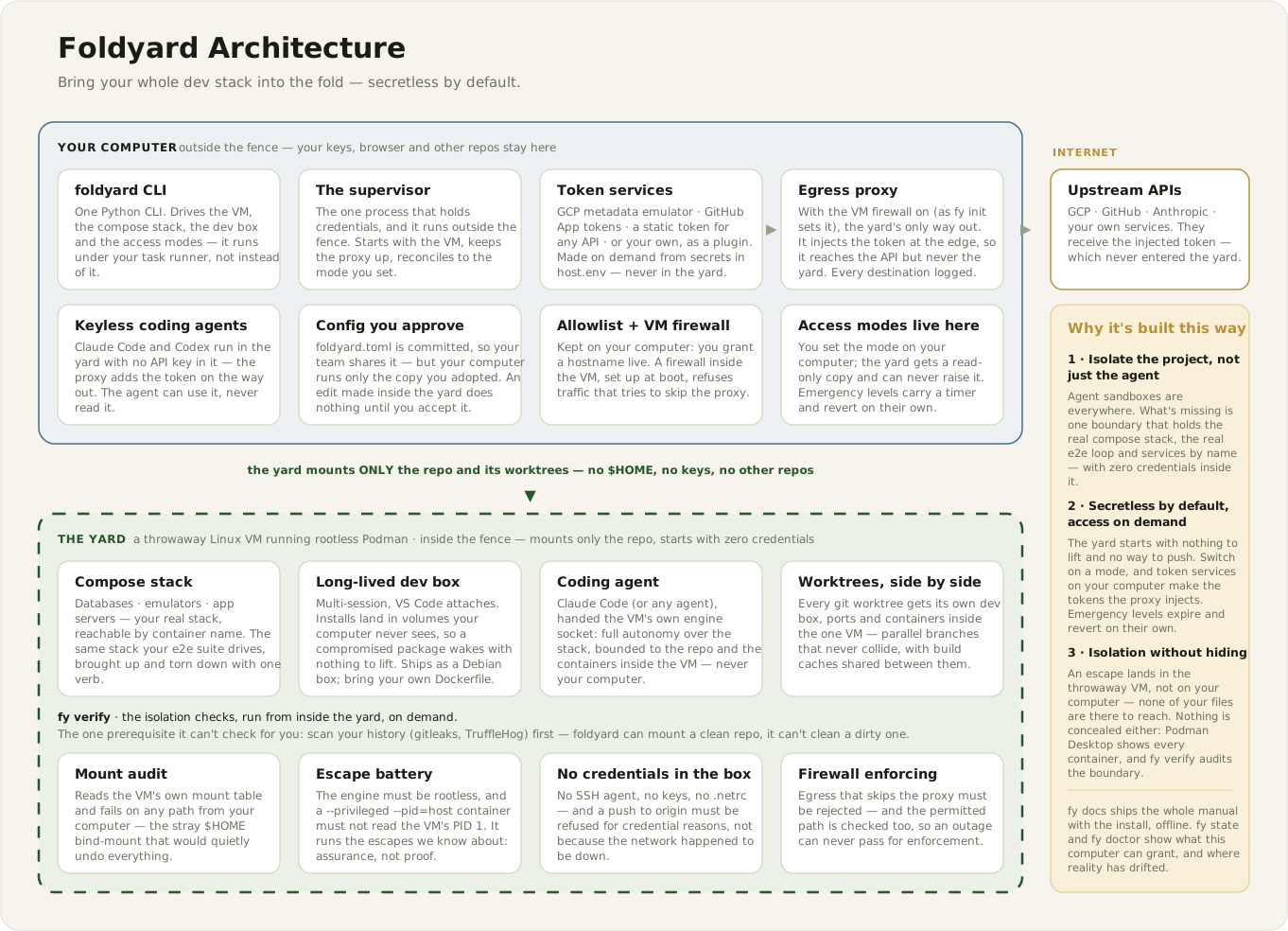
A fold-yard is the enclosed farmyard where livestock are folded (penned) for the night. That's the whole idea: everything that runs untrusted code lives in the yard, and your computer – keys, browser profile, other repos – stays on the other side of the fence. You can still lean over it and see everything that's going on, you just don't let the animals into the kitchen.
In practice that means:
- One throwaway Linux VM per project, created with Lima, running rootless Podman. The VM mounts your repo and nothing else, so even an escape from a container to the VM finds no home directory to raid.
- The whole stack inside it: your docker-compose services, dependency installs, the IDE backend and, if you want, your coding agent – all in one place, reachable by container name, so the real test loop works.
- No credentials inside, by default. No
~/.ssh, no tokens, no credential helpers. When you do need real access you switch it on (fy mode github=on gcp=logs), and token services on your computer mint short-lived, scoped tokens that an egress proxy adds to requests on the way out. The upstream API gets the token, the yard never does. The levels that act as you expire on a timer and switch themselves off. - Keyless agents. Claude Code and Codex run in the box with a dummy API key, and the proxy swaps in the real one – so there's nothing for a prompt injection to exfiltrate.
- All traffic out goes through the proxy, which logs it and checks it against an allowlist you can extend live. A firewall inside the VM refuses anything that tries to skip the proxy.
- You approve config changes. An agent in the box can edit
foldyard.toml(and is told how), but nothing takes effect until the nextfy box upshows you the diff on your own computer and asks. fy verifyaudits the boundary from the inside: the mounts, the sockets, the credentials that shouldn't be there, and a set of known escapes that should be refused. It tests the escapes I know about – it raises confidence, it can't prove there are none.
Getting started is meant to be boring:
brew install uv lima podman      # Linux and WSL2 instructions are in the docs
uv tool install foldyard         # gives you `foldyard`, and `fy` as shorthand

cd your-repo
foldyard init                    # writes a locked-down foldyard.toml
fy box up                        # creates the VM and the dev box
fy box shell                     # you're in the yard
There's one prerequisite I can't automate away: a clean repo. The VM mounts only your repo, so the zero-credential promise holds exactly when the repo contains config rather than secrets. Run gitleaks or TruffleHog over it first. Foldyard can mount a clean repo, it can't clean a dirty one.
And those VS Code sockets?
It felt only right to close the loop on the thread that started it all. VS Code still attaches to the box (through the container engine, rather than SSH, so there's no sshd or inbound credential inside), and it still tries to forward your SSH agent and git credentials into every terminal it opens. The difference is that foldyard now defuses this at the source: fy code launches VS Code with an empty SSH agent and switches off VS Code's git terminal authentication, so the bridges are never installed in the first place. A reaper loop is still there as a second layer for a manual "Attach to Running Container", but it's no longer the thing holding the line – and even if it lost the race, the VM firewall means github.com:22 needs its own explicit grant. fy verify reports both the variables and the sockets.
Whack-a-mole, it turns out, is a lot more relaxing when you're not the last line of defence.
From work project to workshop
Foldyard started life in June as the dev environment for our monorepo at Tangible, where we needed something that would let agents (and humans!) run our full stack without carrying the keys to everything. By September it had grown enough opinions that it deserved to stand on its own, so I extracted it into an Apache-2.0 licensed open source project. It's currently on version 0.7.0, and the architecture decision records document the reasoning behind the bigger choices – including the ones I got wrong the first time.
Then I got accepted to run a workshop at J On The Beach: YOLO Mode Without the Yikes – Sandboxing Autonomous Coding Agents. Nothing focuses the mind quite like the prospect of thirty people with thirty different laptops trying to install your tool at the same time.
The workshop was a great forcing function. "Works on my Mac" wasn't going to cut it, so foldyard grew real Linux and WSL2 support, with CI booting an actual Lima VM on Ubuntu and inside WSL2 on a Windows runner to drive the whole loop end to end. It also got a workshop guide for both organisers and attendees, with the slow downloads moved to before the day so the session itself could go on people's own projects rather than progress bars.
It also nudged me to separate the idea from the tool. The first half of the workshop is deliberately tool-agnostic: read any risk as vector → capability → impact (a fetched web page → a shell with your credentials → a leaked token), then match each protection to the link it cuts. Foldyard only turns up afterwards, as one worked example. I'd much rather people left able to choose a sandbox that fits their own risks than convinced they need mine.
Where it's at
It's alpha, and I'd rather be upfront about the rough edges than have you find them:
- macOS is what I use every day, with a production project. Other repos have only been lightly tested.
- Linux (x86-64) and WSL2 pass the CI end-to-end tests, but the TUI and editor attach haven't had much real-world use there yet.
- Proxy routing relies on proxy environment variables, which well-behaved software honours and malware may not. The VM firewall closes that gap, which is why
foldyard initswitches it on. - Switching a credential on during an untrusted install is the one window where install-time code and a live token meet. The timers help, but don't eliminate it.
- The neighbourhood moves fast. The "secrets stay outside, a proxy swaps placeholders for real tokens" trick went from rare to near-standard in about a year, and some neighbours are ahead of foldyard on details like DNS pinning and address handling. The prior art notes try to keep an honest record of where it stands.
Foldyard has also become a handy testbed. Watching the kernel from outside the box let me run an experiment on whether kernel events help catch a sneaky agent – the short answer being "not as much as I hoped", but that's a story for the post.
Why bother
I keep coming back to the fact that a developer laptop has quietly become one of the most valuable things to compromise in a company. It holds the keys to production, the source code, the cloud consoles – and it's also where we run thousands of strangers' packages and now hand a shell to an LLM that reads the open web all day. Cloud dev environments are one answer, but I like doing my work on my own machine, offline when I want to, with the stack I can see.
The point of the fence isn't distrust of the agent, it's being able to say yes to it more often. If the worst it can do is mess up a throwaway VM and a repo that's in git anyway, I can let it get on with things while I make a coffee or send another agent down a research rabbit hole.
Credits
Huge thanks to Giles Knap, whose comments on my dev containers post pushed me towards rootless Podman in the first place – do check out his own take, claude-sandbox, which makes some different and interesting choices. Thanks also to stevenhuyn, p-buddy and everyone else in that thread for proving I wasn't the only one going down this rabbit hole, and to Tangible for letting it be open source.
Foldyard stands on the shoulders of Lima, Podman and mitmproxy, and the diagrams come from the foldyard docs.
It's alpha, so brave testers are very welcome – if you try it and something breaks, open an issue!